Fader Isn't a Prompt Generator. It's the AI Studio Manager I Use Every Day.
How I actually use Fader across mixing, mastering, prompt design, release, and registration, and why the results don't compare to generic AI.
Most AI music creators have the same problem. They have ChatGPT open in one tab, Suno in another, Mureka in a third, Reaper running in the background, and a Google doc somewhere with notes about a track they're trying to finish. Every tool has its own logic, its own prompt syntax, its own quirks, and its own way of failing when the output doesn't match the idea in your head. The creator becomes a switching station between tools that don't talk to each other. That's not a workflow. That's chaos with extra steps.
Fader exists to be the layer that ties it together.
I built Fader because I needed it myself. I run five AI bands with active Spotify releases, my own human band production work on the side, and the ongoing production research that feeds the Red Lab Protocol. Fader is open on my screen during every one of those workflows. Mixing, mastering, generating, releasing, promoting. That isn't a marketing claim. It's how I actually work.
Fader is not a prompt generator. It's not a chatbot. It's an AI Studio Manager built on the Unlock methodology, the JG BeatsLab books, Red Lab research, platform-specific workflows, and six months of refinement from real creator use. When you bring a problem to Fader, you're not getting generic AI music advice scraped from Reddit. You're getting the answer the Unlock System would give, informed by the methodology that actually works for AI music creators operating in Lane 2 (human-authored, AI-assisted production).
Here's what that looks like in practice.
How I Use Fader
Mastering with WAV file analysis. When I'm mastering a track, I drop the WAV file into Fader and ask for analysis. Fader tells me what to adjust in my DAW with specifics: which frequency ranges are crowded, where the dynamics are flat, what the LUFS reading suggests, and which Reaper plugins to reach for to fix the specific issues in the track. File analysis works best on a paid ChatGPT plan because audio review can hit free-tier file and message limits quickly. Free users may be able to test the workflow, but serious WAV and stem review is a paid-plan use case in practice. Fader doesn't replace my ears or my DAW meters. It gives me a second set of production notes before I start turning knobs. Generic ChatGPT gives me a list of mastering principles. Fader gives me the moves to make on this track.
Stem analysis during mixing. I do the same thing during the mixing process. I share stems with Fader and get track-specific feedback on what's working and what isn't. This applies to both my human band productions and my AI bands generated from Suno or Mureka. The methodology is the same. The source material is different. Fader doesn't care whether the vocal stem came from a singer in my home studio or a Suno generation. It analyzes what's actually there and tells me what to do about it.
Prompt brainstorming and refinement. I come up with the initial creative idea for a track myself, the Golden Seed in Unlock System language. Then I bring it to Fader and ask for prompt adjustments before I ever hit generate. Fader knows the difference between how Suno parses a prompt and how Mureka does. It knows when to push harder on genre vocabulary versus production vocabulary. It knows when reference audio is going to dominate the text prompt on Mureka and when to lean into categorical commands like "Instrumental Only" instead of negative phrasing like "no vocals" (which Mureka often ignores). Real example: instead of "make a Drake-style sad trap song" (a prompt that creates No FAKES Act risk and gives the model a celebrity target it shouldn't be aiming at), Fader pushes me toward "modern nocturnal trap soul, minor key, 85 BPM, sparse 808s, glassy pads, intimate melodic vocal, late-night emotional tension, no artist imitation." That's the No FAKES reframe and the production vocabulary in one shot.
Not a chatbot, a working partner.
Fader is your AI Studio Manager. Built to help you plan tracks, diagnose bad generations, fix prompts, master smarter, and move from idea to release without wandering.
Not a generic chatbot. A working partner.
"Best studio manager / advisor ever. Solved a real mastering issue. I upgraded my ChatGPT to run Fader in Pro mode." — JG BeatsLab member
$47 — One-time purchase. Lifetime access. No subscription.
Already have the Red Lab Library? You already have Fader.
━━━━━
4.7 stars | 50+ ratings | 1,000+ conversations
Rated by JG BeatsLab members who use Fader in active production.
━━━━━
WHAT FADER DOES
Fader covers the full production-to-promotion workflow across Suno, Mureka, ElevenLabs, Reaper, and release infrastructure.
MAKE. Brief development, prompt engineering, Songsheet construction, platform-specific generation strategy.
DIAGNOSE. Suno Stack analysis, Mureka model behavior, generation failure patterns, artifact identification.
MASTER. Reaper chains, LUFS targets, EQ and compression decisions for AI music output.
REGISTER. PRO registration, MLC, SoundExchange, DistroKid setup, the right order of operations.
PROMOTE. Release timing, platform positioning, owned-channel planning.
PROTECT. No FAKES Act risks, voice likeness issues, AI disclosure, rights hygiene.
Generic AI answers questions. Fader runs the session.
━━━━━
WHO FADER IS FOR
Fader is built for creators who are done gambling with AI music tools and want a system.
If you are producing tracks, building a catalog, planning releases, or trying to figure out why your generations are not matching your intent, Fader is the working partner that closes those gaps.
Who Fader is not for: If you are new to AI music and just want to make a single track for fun, you do not need Fader yet. Start with the books. Come back when you are ready to operate as a Director instead of a Vending Machine Operator.
━━━━━
WHAT YOU GET
When you purchase Fader, you receive:
Direct access to Fader. A custom AI Studio Manager available 24/7 through ChatGPT.
The Fader Welcome Guide. A 15-page methodology PDF covering access, the best first prompt, six core use cases, the Unlock System vocabulary, compliance notes, and tips for maximum value.
Lifetime access. One-time purchase. No subscription.
The price math. One bad release, one wasted mastering chain, or one week of failed prompting costs more than this.
Not hype. Just math.
━━━━━
TESTIMONIALS
"Best studio manager / advisor ever. Solved a real mastering issue. I upgraded my ChatGPT to run Fader in Pro mode." — JG BeatsLab member
"Have you tried with Fader guiding the session yet? It's the real deal." — JG BeatsLab member
"Fader initiated the idea of a 3-track EP. I went along with it, and now I have a finished EP I never would have made on my own." — JG BeatsLab member
"Turns Suno into a producer and set of session players instead of an uncontrollable wild horse doing its own thing." — JG BeatsLab member
"Prompts stopped being wish lists and became score sheets." — Verified reader
"Shifted my mindset from seeing AI as a threat to seeing it as a powerful creative partner." — JG BeatsLab customer
━━━━━
ABOUT CHATGPT ACCESS
Fader runs inside ChatGPT. Your purchase includes Fader access and the Welcome Guide. A paid ChatGPT plan is recommended for serious production work but not included. For current ChatGPT plan options, features, and pricing, visit OpenAI directly. JG BeatsLab does not manage your ChatGPT account, billing, or subscription.
━━━━━
FREQUENTLY ASKED QUESTIONS
How do I access Fader after purchase?
After checkout, you receive an automated email with your Welcome Guide PDF. The PDF contains a direct access link to Fader. The link routes through jgbeatslab.com so your access stays consistent even if anything changes on the back end.
Do I need a paid ChatGPT subscription?
No, but it is strongly recommended. Free accounts can access Fader, but GPT usage on the free tier is subject to daily limits that may interrupt sustained production work. Paid plans provide significantly higher usage limits, better access to current models, and a smoother working experience.
What if I already have the Red Lab Library?
The Library includes Fader. This standalone product is for creators who want Fader on its own, without the full Library. If you already own the Library, you don't need to purchase Fader separately.
Can I use Fader for platforms other than Suno?
Yes. Fader covers Suno, Mureka, ElevenLabs, Reaper, and release planning workflows. Tell Fader which platform you are using first because guidance routes differently for each tool.
Does Fader remember my projects between conversations?
Same chat: history remains available. If you return to the same ChatGPT conversation, Fader can pick up where you left off. New chat: start fresh. The Welcome Guide includes a project handoff template for returning to projects in new chats.
What is your refund policy?
Fader is a digital product with immediate access upon purchase. Refunds are not offered for change of mind. If you experience a technical issue accessing Fader or the Welcome Guide, contact josh@jgbeatslab.com and I will make it right.
━━━━━
If Fader becomes part of your daily workflow, the Red Lab Library is the natural next step. It includes Fader plus all seven Unlock System books, every Blueprint, the Red Lab Protocol research reports, the case studies, the Field Notes, the Quick Start Kit, and the 3-Song Sprint course.
$97, one time. No subscription.
━━━━━
Stop gambling with AI music tools. Start directing.
$47. One-time. Lifetime access.
Iteration when the output misses. When the AI generation doesn't match what I had in my head, I feed the result back into Fader and ask what to adjust. This is where the difference between Fader and generic AI is most obvious. Generic AI tells me to "try a more descriptive prompt." Fader diagnoses which layer of the system actually failed: model routing, persona drift, weak style box, structure problem, lyric tag issue, or post-generation artifact. Then it tells me how to fix the right part. That's the difference between random regeneration (gambling) and a repeatable workflow (directing).
That's the core production loop, and it would be enough on its own to justify Fader. But the production phase isn't where most creators get stuck.
Where Fader Goes That Generic AI Can't
The biggest surprise for most users is that Fader is just as useful after the song exists as it is during creation. It helps move through the unglamorous parts of the workflow that decide whether a track becomes an asset or a one-time post: metadata, rights registration, royalty collection, AI disclosure, mastering decisions, release prep, and promotion strategy. That's where most AI music creators fall apart. Fader keeps the workflow intact.
When a creator pastes lyrics that include production notes by mistake (something like [Chorus] big anthemic full band written into the lyrics box), Fader catches it before the platform sings the production note as a lyric. That kind of save costs nothing to deliver and prevents a generation that would have been useless.
The same thing happens on the compliance side. If a creator asks for an artist imitation, Fader redirects the request into original genre, mood, tempo, instrumentation, and vocal-energy language before the creator builds legal risk into the track.
When a creator has a finished track and asks how to release it, Fader doesn't just say "upload to DistroKid." It walks through the actual release checklist: confirm the song title, artist name, writer splits, master file, cover art, metadata, AI disclosure status, distributor fields, ownership notes, and the registration steps that distribution alone doesn't cover (PRO, The MLC, SoundExchange, and publishing administration where it applies).
When a creator asks how to promote a release, Fader doesn't say "post everywhere." It turns the question into a campaign: audience, hook, short-form content angles, platform priorities, owned-channel assets, and the playlist scams to avoid. The goal isn't activity. The goal is a repeatable promotion system.
When the same creator brings a song that's better suited for sync licensing than for Spotify discovery, Fader tells them so. Not every track should be marketed the same way, and Fader knows the difference between a song built for TikTok hooks and an instrumental built for sync.
The thread connecting all of these is that Fader operates across the full Make, Master, Register, Promote chain. That's the Unlock System in motion.
What the Difference Actually Looks Like
It's one thing to claim Fader outperforms generic AI on these questions. It's another to show it. I ran the same prompts through Fader and through a generic ChatGPT chat to compare the answers head to head. Two examples worth showing.
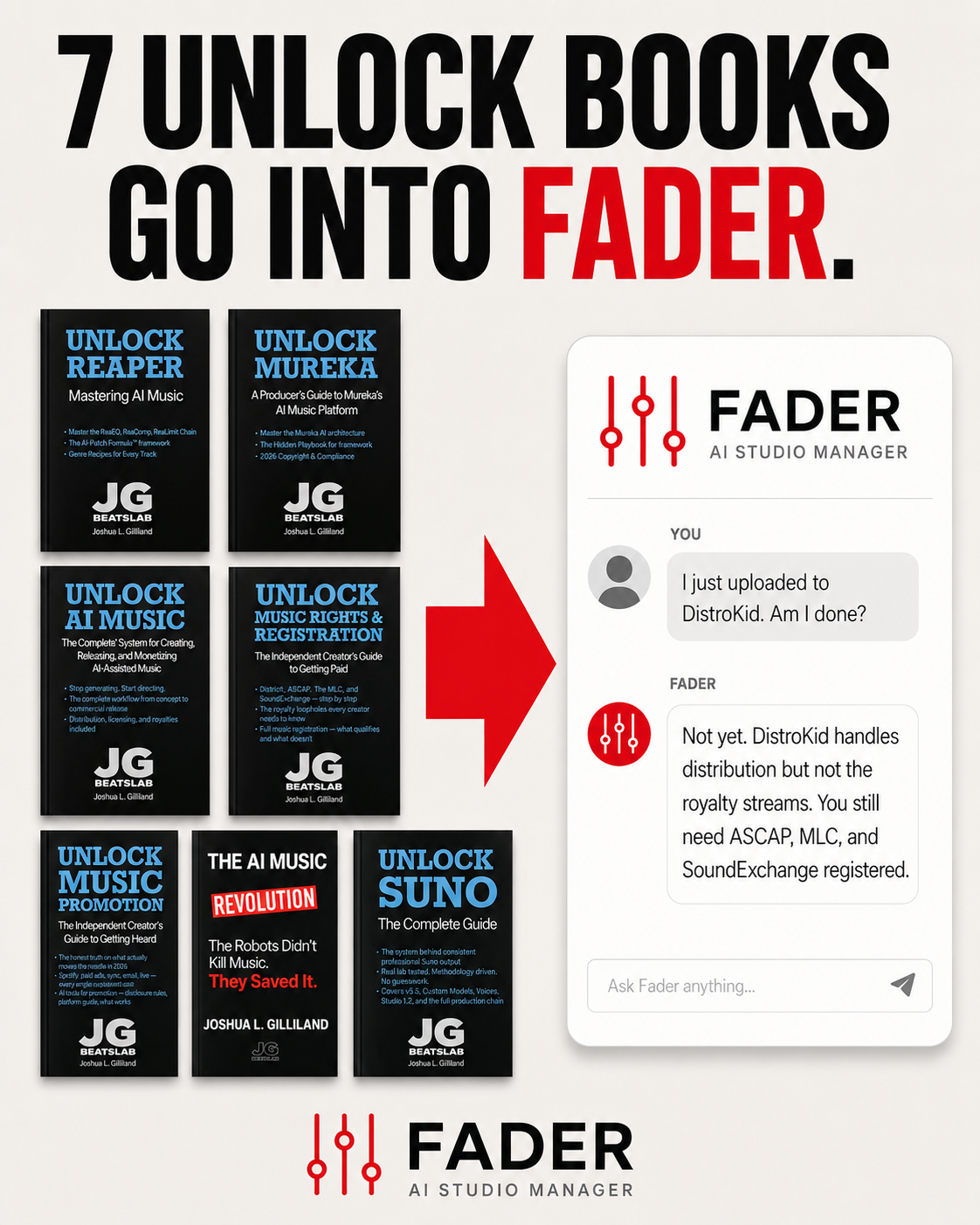
Example 1: "I just uploaded to DistroKid. Am I done?"
This is the question that decides whether a creator collects all the money they're owed or leaves a significant chunk on the table.
The generic ChatGPT response covered the obvious: verify store delivery, claim artist profiles on Spotify and Apple, check metadata, prepare content assets, register with PROs (ASCAP and BMI). It was organized, readable, and not technically wrong as far as it went.
What it missed: The MLC (the Mechanical Licensing Collective, which collects mechanical royalties on streams in the US) and SoundExchange (which collects digital performance royalties from Pandora, SiriusXM, and non-interactive streaming). Those are not optional. They are separate royalty buckets that DistroKid does not touch. A creator following the generic advice would assume PRO registration handles everything and would never know there are two more registration systems collecting royalties on their behalf.
Fader's response identified the full registration ecosystem (PROs, The MLC, SoundExchange), added Lane 2 AI-rights considerations (human authorship, lyric ownership, AI platform commercial rights tier), and framed the answer in the MAKE → MASTER → REGISTER → PROMOTE workflow. Fader also flagged something generic didn't: that AI music creators have additional rights considerations under current US copyright guidance, which means safe monetization depends on maintaining the human-directed, AI-assisted Lane 2 workflow.
This isn't a stylistic difference. It's a factual gap. Generic AI didn't know to tell the creator about two of the major royalty streams they're entitled to.
Fader does not replace legal counsel, but it does keep the release workflow from missing obvious registration and rights steps.
Example 2: "My Suno chorus keeps drifting. What do I do?"
The generic ChatGPT response gave nine tactical tips: simplify the chorus description, use repetition language, reduce section complexity, fewer emotional adjectives, generate instrumental first, shorter prompts, regenerate only the chorus, narrow vocal range, add genre anchors. The tips were reasonable. A creator following them would probably improve their output.
Fader's response opened differently. Before offering tactics, Fader identified that there are actually three distinct types of drift creators encounter: melody drift (the chorus melody loses emotional logic from the verse), vocal identity drift (the singer changes tone, accent, or phrasing mid-song), and harmonic drift (chord movement shifts the emotional center, leaving the chorus without resolution). Each type has different symptoms and different fixes. As Fader put it: "Most users think all three are 'bad melody.' They're different problems."
Then Fader gave the diagnostic before the tactics: figure out which type of drift you have, then apply the right fix. The response also referenced Suno v5.5-specific behavior, the Golden Seed Method, and the Director's Cut Workflow, all from the Unlock System methodology.
Generic AI gives the creator more shots in the dark. Fader gives them a diagnostic system to identify which problem they actually have first, then a targeted fix.
Why That Difference Exists
The pattern across both examples is the same. Generic AI can answer most music questions competently because the underlying knowledge exists in its training data. What it can't do is connect those answers into a methodology that runs across the full workflow. It can tell you about The MLC if you ask the right question. It won't tell you about The MLC when you ask "am I done after uploading?" because nothing in its training links those two ideas.
Fader has been built specifically for that. Its knowledge base draws from every Unlock book, the Red Lab Protocol research, the methodology framework, and the accumulated knowledge from six months of refining the system based on what real creators actually ask. Fader understands AI music generation, but it also understands mixing, mastering, release operations, rights and registration, royalty collection across all five income streams, AI disclosure policies, and promotional strategy. That breadth, paired with the methodology it's trained on, is unlike anything else on the market.
It's the difference between asking a generalist a music question and having a music industry professional sitting next to you while you work. The generalist gives you principles. The professional gives you the next move.
Fader didn't ship as a finished product six months ago and stop. Every time a member sent feedback that Fader missed something, the system prompt got tuned. Every time the methodology evolved (new books, new Suno releases, new Red Lab findings), Fader's knowledge got updated. The current version is rated 4.7 out of 5 across more than a thousand conversations. That's what continuous refinement looks like in practice.
Where Fader Fits
Fader is included with the AI Music Premium Starter Kit at $67 and Red Lab Access at $117 lifetime. As of May 25, Fader is also available as a standalone purchase at $47 for creators who want the studio manager without the full bundle.
Lifetime access. One-time purchase. No subscription. Future Fader updates included.
The Real Question
Most AI music creators are stuck between making a track and building a finished, mastered, registered, released asset. Fader closes that gap. It's the difference between operating like a vending machine operator and operating like a director.
Stop gambling with AI music tools. Start directing.
— Josh / Founder, JG BeatsLab
